From Vibe Code to Live App: The Whole Map
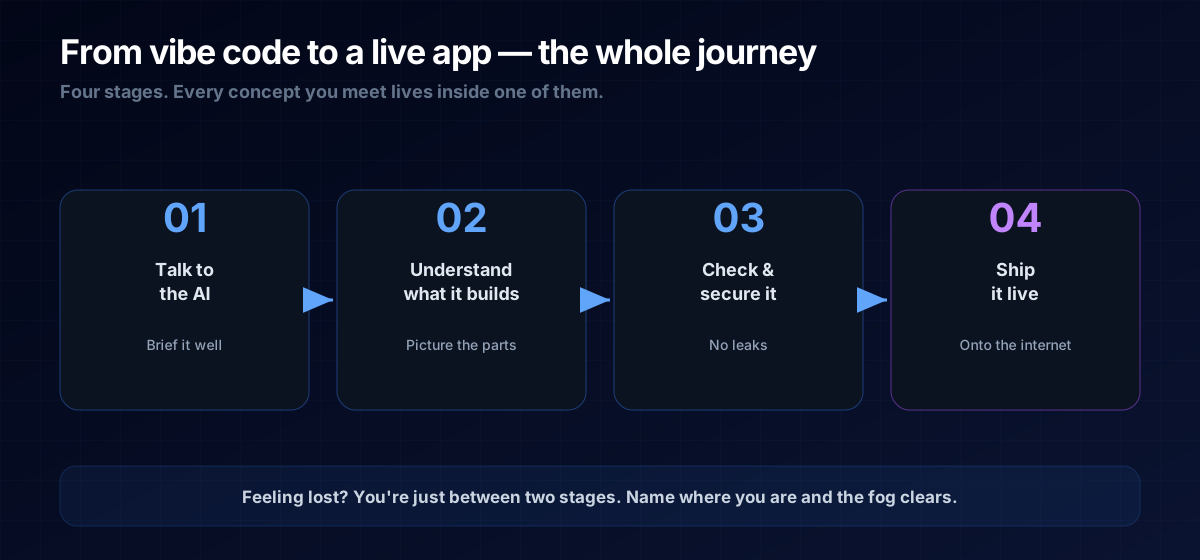
The big picture: talk to the AI, understand what it builds, check it, then ship it. Four stages, one path.
Most "learn to code" content hands you a pile of definitions and leaves you to assemble the map yourself. This page is the map. If you're building software with an AI and you keep feeling lost, it's almost always because you can't see where you are in the journey. Here's the whole thing, start to finish, in four stages — with a one-line answer for each and a link to go deeper.
THE ONE-LINE VERSION
Building with AI is four steps: talk to the AI, understand what it builds, check and secure it, then ship it live. Every concept you'll meet is just a detail inside one of these.
Stage 1 — Talk to the AI
Everything starts with how you brief the machine. The difference between a frustrating session and a magical one is rarely the AI — it's the instructions. You learn to describe what you want and why, not to dictate code line by line.
Go deeper: what an LLM actually is, how to brief an AI, and prompting principles that don't expire.
Stage 2 — Understand What It Builds
The AI writes code, and suddenly there's talk of frontends, backends, APIs, and databases. You don't need to write any of it — but you need to picture it, so you can tell when something's off and ask the right follow-up.
Go deeper: frontend vs backend, what an API is, what a database is, and what JSON is.
Stage 3 — Check & Secure It
A working prototype is not a safe product. This is where the smart founders separate from the ones who leak API keys on launch day. You learn to sanity-check what the AI wrote and keep your secrets out of harm's way.
Go deeper: how to check AI-written code and environment variables & secrets.
Stage 4 — Ship It
The final gap — and the one that stops the most people. Your code lives on your screen; the world lives on the internet. Getting from one to the other means version control, a build step, and hosting.
Go deeper: what version control is, what a build actually is, and hosting, domain & DNS.
The Prompt Template
Whenever you feel lost, orient the AI (and yourself) by naming the stage you're in:
I'm a non-technical founder building this with you.
We're currently at the "[stage: e.g. shipping it live]" step.
Here's what I'm trying to do: <goal>.
Here's where I'm stuck: <what's happening>.
Explain the concept in plain English first, THEN give me the fix.A: Roughly, yes — but you'll loop back constantly. You'll brief the AI, see what it builds, spot a problem, brief it again. The map tells you which loop you're in.
A: No — the AI does the heavy lifting. You need just enough of a mental model to give good instructions and catch problems. That's exactly what these guides give you.
Next Steps
Start at Stage 1: How to Brief an AI — or, if you'd rather skip the assembly entirely, see the pre-architected Micro-SaaS blueprints so you and your AI can just build.